@Exergy has developed a few Home Assistant integrations for controlling and monitoring a few different miner models as well as monitoring different pools. Available on GitHub and easy to import into HACS. Instructions can be found in the respective READMEs or on docs.exergyheat.com
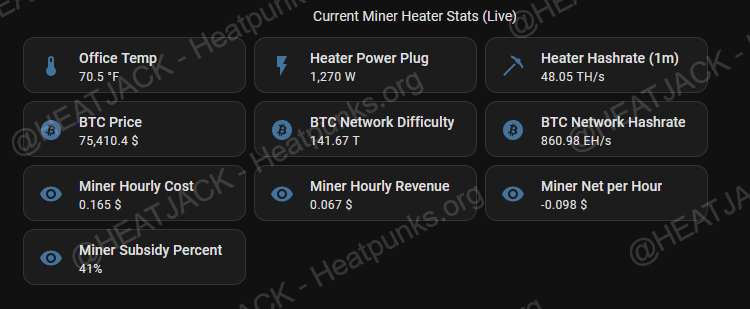
Thanks for creating this HA integration! I’ve been using it and plan on posting what I’m currently doing with the entities and sensors that show up in Home Assistant thanks to your HA project. Here’s the latest dashboard I created with it last week:
It displays my office room stats and my Loki rig’s real‑time data, using both the smart plug’s power readings and the BTC network. When I put all of that together, I can see the “heating rebate” I’m effectively getting at any given moment.
Some Feedback & Request:
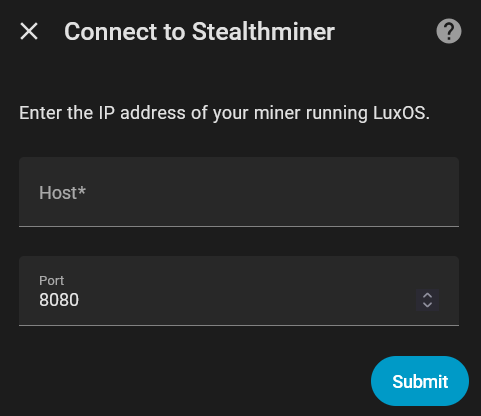
During setup, it will prompt you for the miner’s IP address and port. I initially entered my miner’s IP with port 4028, but kept running into errors. Leaving the port at the default 8080 solved the issue immediately.
Fan control, is there was a way to implement LuxOS API fan settings? It would be nice to control the fans when they’re in auto made. Here’s some info from the LUXOS API guide: https://docs.luxor.tech/firmware/api/luxminer/fanset - The end goal being able to make those API calls using HA to control the fans and set a range so they don’t fluctuate so rapidly in automatic mode.
Just out of curiosity, why did you try changing it to 4028?
I was following the Configuration steps from Github:
Go to Settings > Devices & Services
Click + Add Integration
Search for “Stealthminer”
Enter your miner’s IP address and port (default: 4028)
Click Submit
TLDR; The readme says to enter the miner’s IP and port (default 4028), so I thought that meant the integration needed that port and changed it. I’m still pretty new to Home Assistant